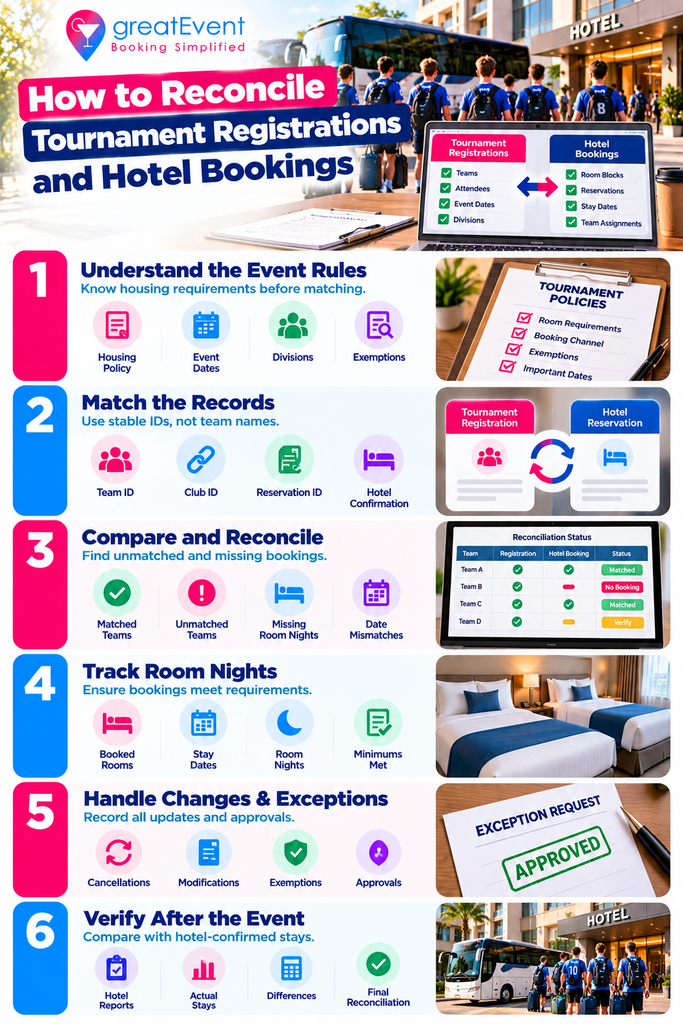
Quick answer: Match each event’s team IDs to current booking records, check room nights against the applicable housing policy, and resolve unmatched reservations, cancellations, and exemptions. After the tournament, compare those records against hotel-confirmed stays. Registration, hotel booking, and housing compliance stay three separate statuses throughout.
A team can pay its entry fee and still have no confirmed rooms. Another books under a club name that doesn’t match its registration, and a local team may need no hotel at all. Two headline totals won’t show you any of that, or which teams need help this week.
Reconciliation connects who is playing, what lodging is booked, and what your rules require. The workflow below is our recommendation. The policies and software cited come from specific events and vendors, so check them against your own tournament’s rules.
The four records you’re reconciling
| Record | What it establishes | What still needs checking |
|---|---|---|
| Team registration | The team’s event entry and registration status | Housing requirement, bookings, approval conditions |
| Held room block | Inventory allocated for possible booking | Whether individual reservations were completed |
| Hotel reservation | A booking record with dates and a current status | Team attribution, qualifying nights, hotel confirmation |
| Completed hotel stay | Rooms actually used, verified after the event | Differences from booked nights and contract credits |
EventConnect’s hotel reporting distinguishes reserved rooms from rooms sitting in team subblocks and from remaining availability, and its registration and reservation reports expose different filters and records. That separation is a useful starting point for your own design.
Keep three questions apart: is the team entered, is its lodging confirmed, and has it met the housing requirement? A single green “complete” field hides at least one missing answer, usually the third one.
Start with the rules for this event
Before matching anything, document the event, season, divisions, required booking channel, applicable dates, room or room-night minimums, the exemption process, and the review deadlines. Name who can approve an exception and who can change a team’s acceptance status.
Published policies show why copying last season’s rules is risky. Big South’s terms distinguish general bookings from loyalty reservations and restrict combining multiple teams into one contract. Florida Region’s published guidelines describe room-night minimums and specific exemptions that require verification. Apply the current instructions for your tournament, and take unclear wording back to whoever owns the policy rather than interpreting it yourself. Our explainer on what a stay-to-play requirement is covers the general shape of these rules.
If your tournament requires no hotel booking, use reconciliation to track lodging demand and help teams. Do not mark a team noncompliant because it booked elsewhere or needs no overnight stay.
Record exemptions at the right level. An approved exception for one traveler does not exempt the team. Store the approval scope, the decision date, and whatever requirement still applies.
Match on stable IDs
Match on event ID plus team registration ID. Keep the housing provider’s reservation ID and the hotel’s confirmation number in separate fields, because they refer to different stages of the same booking and they arrive at different times.
Ask both providers how those identifiers travel between systems. Where the systems use different team IDs, maintain a mapping table. Keep a club ID as a grouping field, since one club routinely enters several teams across divisions.
Team names are unreliable. “Falcons 16 Blue” and “Falcons Blue 16U” could be the same team, and two “Falcons” entries could be two different clubs. A manager’s email address helps you investigate a mismatch, but one manager often handles several teams, so don’t use it as the matching key.
When IDs are missing, send the record to a review queue. Verify the event, club, division, dates, and authorized contact before assigning it, and record who confirmed the link. A suggested name match should never trigger a compliance decision on its own.
What the tracker should hold
Keep team summaries separate from reservation details. One team can have many reservations, so a single row per team cannot preserve the booking changes you will need later.
| Table and row unit | Recommended fields |
|---|---|
| Teams, one row per event/team | Event ID; team ID; club; division; registration status; travel status; adult contact; policy |
| Reservations, one row per current booking | Provider reservation ID; hotel confirmation; mapped team ID; hotel; arrival and departure |
| Exceptions, one row per issue | Issue ID; affected team or booking; reason; evidence reference; owner; due date; decision; approver |
| Nightly totals, one row per hotel/date | Contracted or held rooms; currently reserved rooms; verified rooms used; report time |
Preserve the original exports somewhere restricted and work from dated copies. Record the export time and, where you have it, each record’s last update. Two reports pulled on different days will disagree without either one being wrong, and knowing that in advance saves an afternoon.
Limit the tracker to what reconciliation needs. Full payment-card details, medical information, and children’s birth dates are not matching fields. Where a policy requires supporting personal information, keep the evidence with authorized reviewers and put a restricted reference in the operational tracker. The FTC recommends collecting only necessary information, limiting access, and retaining it only while there is a legitimate business need.
The six-step workflow
1. Take comparable snapshots
Export registration and housing records using the same event scope and an agreed reporting window. Include withdrawn teams and canceled reservations in the source data so you can see what changed, then exclude them from active totals using defined status rules. EventConnect documents a registration CSV export and reservation filters covering confirmation and cancellation status.
2. Match in both directions
Match active teams against bookings, then match bookings back against registrations. The first pass finds teams with no lodging. The second finds bookings attached to withdrawn teams, the wrong event, or no identifiable team at all.
If you run only the first pass, orphaned bookings can survive until the hotel invoice arrives. Keep staff, officials, and approved spectator bookings in their own categories rather than forcing them into team records.
3. Deduplicate, then calculate nights
Identify the latest valid version of each booking from its source identifier and history. A changed departure date updates the reservation; it does not create extra pickup. Keep the old version for review without counting both as active.
For a constant room quantity, room nights are rooms multiplied by nights stayed. Friday check-in to Sunday checkout is two nights, so four rooms across that stay is eight room nights. Where quantities change by night, sum the nightly counts instead. How to size a group block works through the same arithmetic from the planning side.
Separate total booked nights from qualifying nights. Apply the event’s allowed dates, booking channels, room categories, and team-credit rules. An extra vacation night raises hotel demand without satisfying the tournament requirement, and those two numbers should never share a column.
4. Evaluate the requirement
Use explicit labels: requirement met, below requirement, no matched booking, exemption pending, exemption approved, not required, data unresolved. Track hotel confirmation separately, because a booking can be correctly matched to a team and still be waiting on the hotel.
Keep unknowns visible. Missing data is not proof that no booking exists, and a claimed exemption stays pending until the authorized reviewer approves it. Collapsing either one into a compliance figure produces a report that looks decisive and is wrong.
5. Resolve exceptions with named owners
Route each issue to whoever can fix it: the team manager for missing context, the housing provider for booking attribution, the hotel for confirmation or stay discrepancies, the organizer for policy decisions. Give every issue a deadline tied to a real booking cutoff or event decision.
Update the source system where you are authorized to, refresh the report, and confirm the correction appears. Record the resolution rather than silently overwriting the tracker.
6. Reconcile actual stays afterward
Request hotel-verified pickup by night, plus whatever supporting detail your reporting agreement allows. EventConnect’s post-event process asks hotels to confirm nightly pickup and attach a property management system report. That step exists because a pre-event booking export records intentions, and the hotel records what happened.
Investigate no-shows, early departures, room moves, and late reservations. Keep contract-credit, rebate, and commission calculations separate from the operational room-night total. A cancellation charge or no-show payment does not establish an occupied room night, and it does not establish a credit under your agreement either. Room block attrition and shortfall charges covers how that calculation usually runs.
Common mismatches and what to check first
| Exception | Check before taking action |
|---|---|
| Active team with no matched booking | Alternate team names, missing IDs, a pending reservation, an approved exemption |
| Hotel booking for a withdrawn team | Ask the authorized booker about plans. Withdrawal does not confirm cancellation |
| Direct booking outside the official channel | Verify the policy and exemption process. The right hotel alone may not qualify |
| Multiple teams linked to one booking | Whether shared credit is permitted. Allocate only approved credit, never duplicate it |
| Duplicate or replaced reservation | Use provider history and current status to find the valid record before removing anything |
| Dates do not cover the required stay | Confirm schedule changes and qualifying dates; get approval for any exception |
| Provider booking lacks hotel confirmation | Ask the provider or hotel to verify status; keep the issue open until confirmed |
Do not cancel, rebook, or penalize a team to make the spreadsheet balance. Confirm the facts, get the required authorization, and follow the published process. A correction to registration data may have no effect on the hotel reservation.
Schedule changes feed straight into this table, and what hotel terms a schedule change affects covers the team-side consequences your exceptions queue will start filling with.
A sample team report
Illustrative only. Five active teams are entered in one tournament. Four must each book 12 qualifying room nights. Team C has a fully approved exemption. Every room night below is already matched and confirmed under the sample policy.
| Team | Required nights | Confirmed qualifying nights | Housing status |
|---|---|---|---|
| A | 12 | 12 | Requirement met |
| B | 12 | 8 | 4 nights short |
| C | Exempt | 0 | Exemption approved |
| D | 12 | 0 | No matched booking |
| E | 12 | 16 | Requirement met |
Two of the four teams subject to the requirement meet it, so 2 ÷ 4 = 50%. Team C sits in the exemption count, outside that denominator. Report it as “2 of 4 required teams met; 1 exempt; 2 need action” so the percentage means something to whoever reads it.
There are 48 required room nights and 36 confirmed qualifying room nights. Subtract one from the other and you get 12.
The shortfall is 16, though: Team B needs 4 and Team D needs 12. Team E’s four extra nights don’t cure another team’s shortage under this policy, but a simple subtraction credits them against it. One number tells you to chase one team. The other tells you to chase two, one of which has booked nothing at all.
For your own report, display the as-of timestamp and keep unresolved data separate from confirmed shortfalls. Where no teams are subject to a housing requirement, show the compliance percentage as not applicable rather than as zero.
When to run it
Set the schedule around decisions rather than a fixed number of days. Adapt this cadence to your deadlines and booking activity.
- Before registration opens, agree IDs, report access, policies, approval owners, and how late changes get handled
- During the booking period, reconcile on a regular schedule, and after any material registration or reservation change
- Before each hotel cutoff and acceptance deadline, review unresolved issues early enough for teams and providers to respond
- Before arrivals, confirm current bookings, dates, hotel confirmation status, and escalation contacts
- After departures, obtain hotel actuals, investigate differences, close the period on the agreed timetable
A dashboard should show active teams, teams subject to requirements, exemptions, unresolved cases, qualifying booked room nights, and rooms by hotel and night. Add verified used room nights after the event. Label every metric so nobody mistakes a held block for booked or occupied inventory.
A reconciliation brief you can copy
Event and scope: [Event ID, season, divisions, hotel dates,
                  policy version]
Registration source: [System and export owner]
Housing source: [Provider, hotel reports, export owner]

Matching rules: [Event/team identifiers, provider-to-registration
mapping, reservation identifiers, how manual matches are approved]
Reporting schedule: [Refresh times, time zone, cutoff reviews,
final reconciliation date]

Housing rules: [Required channel, qualifying dates, room-night or
per-night minimum, permitted shared credit, exemption scope,
decision authority]
Status definitions: [Active, canceled, pending, confirmed, exempt,
unresolved]

Exception process: [Issue owner, evidence needed, response
deadline, escalation contact, decision log]
Data handling: [Authorized users, secure sharing method, retention
period, deletion owner]

Post-event closeout: [Who supplies actual pickup, supporting
records, how variances are resolved, which contract governs any
financial credit]
Connect the hotel plan to the tournament plan
Start with hotels that fit the competition schedule, room demand, and transportation needs, then agree the reservation data and reporting process before teams begin booking. How to book hotels for a sports tournament covers the sourcing stage, and team hotel bus parking and drop-off covers the access questions that decide whether a hotel works operationally.
Use greatEvent Sports to explore team hotels, sports venues, and trip-planning options. Where your event requires an official housing provider, confirm the permitted booking channel before anyone reserves. Before you choose a provider, ask which exports or integrations can support the workflow above.
Research and sources
Research checked October 12, 2026. Provider documentation establishes specific product functions and tournament pages establish their own policies. The tracker design, workflow, cadence, and sample calculation are editorial recommendations. The five-team example uses invented figures to demonstrate a counting distinction, not observed tournament data.
- EventConnect, Registration Report. Registration filters and CSV export; documentation updated August 20, 2026.
- EventConnect, Reservation Report. Booking, cancellation, confirmation, team, date, and history fields; updated August 20, 2026.
- EventConnect, Contracted Tournament Hotels. Separates reserved inventory, team subblocks, and availability.
- Big South, Stay and Play Terms. Event-specific booking and team-credit rules; reconfirm for the applicable event year.
- Florida Region of USA Volleyball, Stay to Play Guidelines. Page labeled September 2024; illustrates verified exemptions and housing acceptance checks. Reconfirm current applicability.
- FTC, Protecting Personal Information. Business guidance on collection, access, and retention of personal information.
- EventConnect, Post-Event Pickup Reporting. Nightly pickup confirmation and supporting property management system report; updated September 28, 2026.
- greatEvent Sports. Public sports hotel, venue, and trip-planning positioning. This is not an independent product test, and no automatic registration-to-housing reconciliation capability is claimed or was verified.
Frequently Asked Questions
Does tournament registration automatically reserve hotel rooms? ▾
Do not assume it does. Check whether the registration flow actually creates a hotel reservation and what confirmation it returns. A paid entry, or a hotel booking link in a confirmation email, is not evidence of a completed reservation.
Does a room block count as a hotel reservation? ▾
A block is an allocation of inventory. Count the completed reservations inside it separately, using the provider’s own status definitions. Unbooked rooms held for a team should never inflate confirmed pickup.
Can two teams count the same hotel room nights? ▾
Only where the event policy expressly permits shared credit, and then only as the policy owner directs. Count the actual physical room nights once in hotel totals, even when an approved policy uses a different eligibility calculation.
What if registrations and reservations live in different systems? ▾
Use compatible exports, or an integration that preserves event and team IDs. Maintain an ID mapping and a review queue for unmatched records. Confirm how cancellations, modifications, and refresh delays are handled before you rely on automated status updates.
Should canceled reservations count toward housing compliance? ▾
For current booked pickup, exclude them. The event policy and the relevant contract decide any separate compliance or financial treatment. Keep canceled records in the audit history so the changes stay explainable.
What is the difference between booked and actualized room nights? ▾
Booked room nights describe current reservations. Actualized room nights describe hotel-verified use after the stay. Compare the two to find no-shows, early departures, and other changes before you close the housing report.
Compare vendors for your next event
Search caterers, photographers, florists, planners, and rentals — then send one request to several vendors at once.