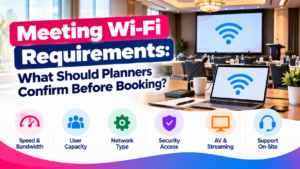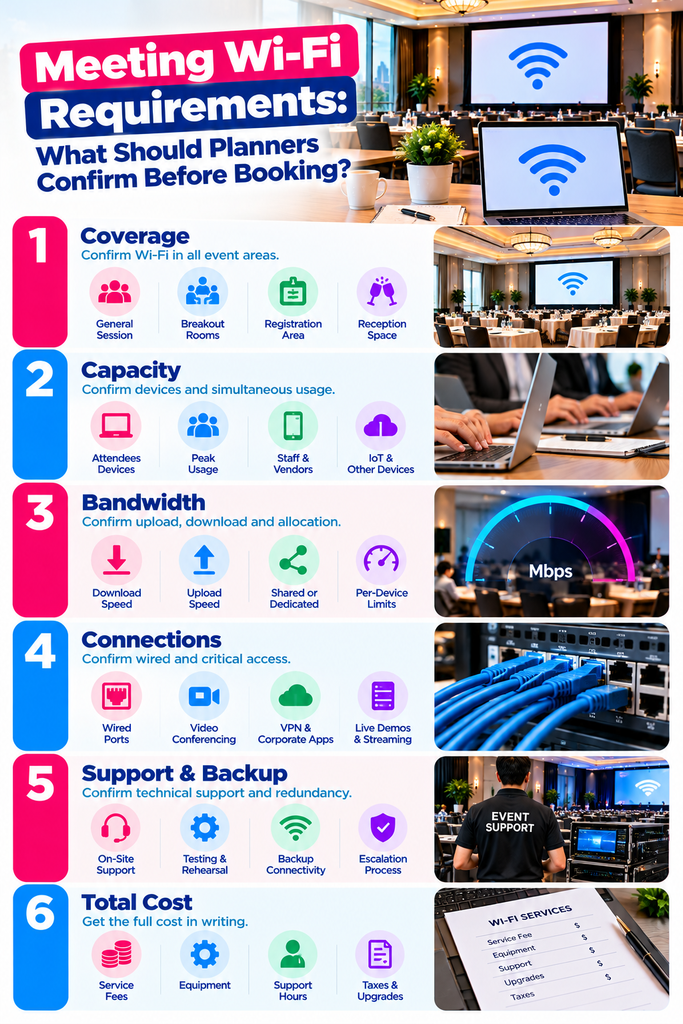
Quick answer: Confirm Wi-Fi coverage in every event space, capacity for the simultaneous devices you expect, the available upload and download bandwidth, and whether that bandwidth is shared or reserved. Then verify wired connections, corporate application access, technical support, backup connectivity and the full cost. Put the agreed requirements in the booking documents.
A hotel can advertise complimentary Wi-Fi and still need an entirely different service for a hybrid meeting, a software training session, or a conference with several hundred connected devices. The venue decision should reflect what people will actually be doing online during the busiest part of your agenda, not what works in the lobby.
This is for corporate meeting planners, conference organizers, association planners and executive assistants confirming connectivity before committing to a venue. The checklist and template are planning tools. The technical figures are attributed to their sources and should be rechecked for your specific booking.
The main requirements
Start from the agenda and the devices that will use the network. Ask the venue’s network specialist, not the sales contact, to respond to this with prices and exceptions. “High-speed internet” is a description, not a specification.
| Requirement | What to confirm |
|---|---|
| Coverage | Named meeting rooms, breakouts, registration, presenter area, reception space |
| Device capacity | Peak connected devices and actively transmitting devices in each room |
| Bandwidth | Event upload and download allocation, sharing, per-device limits |
| Critical connections | Wired ports and service for hybrid production, registration, live demos |
| Application compatibility | Corporate laptops, authentication, VPN, video platforms, cloud tools |
| Network access | Login process, credentials, session expiration, device restrictions |
| Support and testing | Technical owner, support hours, rehearsal access, escalation process |
| Backup service | Failure scenarios covered, capacity, switching method, responsible technician |
| Total cost | Installation, service period, equipment, support, upgrades, fees, taxes |
Ask the venue to name the unresolved items explicitly. Where a meeting depends on a live product demonstration, treat confirmation of that one connection as a booking requirement, not a detail to settle after signing.
Is complimentary hotel Wi-Fi enough?
It can be, for light use, if the venue confirms capacity and access for your group. It is not evidence that the service will carry simultaneous video calls, streaming, or hands-on training.
McCormick Place describes its complimentary wireless as suitable for email and basic websites, says availability depends on user volume, and recommends a wired connection for mission-critical product demonstrations. [1] That is one venue’s published position rather than a rule for every property, but the shape of it is common.
Ask whether the included service covers meeting spaces or only guest rooms. Then ask who else is on it: other events, hotel guests, public areas. Get any device cap, per-device speed limit, usage restriction or paid upgrade requirement in writing, because those are the terms that turn “free Wi-Fi” into a problem at 9 a.m. on day one.
How much bandwidth does a meeting need?
There is no reliable Mbps-per-attendee rule that works across corporate meetings. Build the estimate from simultaneous activities and have the venue’s network team validate the design. Mbps is a transfer rate. It says nothing about how many devices a room can hold.
Separate download demand, such as watching video or pulling files, from upload demand, such as sending a presenter’s video or uploading workshop output. A venue’s headline download speed tells you nothing about its upload capacity, and upload is what hybrid meetings run on.
Use application figures at the right scale
Zoom currently recommends 3.8 Mbps upload and 3.0 Mbps download for 1080p group video calling in its desktop app. [2] Those figures describe one endpoint in that video mode. They are not a meeting-room specification.
| Illustrative activity | Upload demand | Download demand |
|---|---|---|
| One desktop endpoint using that Zoom mode | 3.8 Mbps | 3.0 Mbps |
| Ten simultaneous endpoints using that mode | 38 Mbps | 30 Mbps |
The ten-endpoint row is arithmetic on Zoom’s published numbers, not a recommended package. It excludes every other application, all guest traffic, and whatever capacity margin the network specialist decides is appropriate. Confirm the intended resolution, platform and current requirements before buying anything. [2]
Scale matters in both directions. A room using one shared video-conferencing system counts that system’s demand once. Do not multiply it by everyone sitting in the room. A training session where each participant joins their own call is the opposite case, and creates as many endpoints as there are laptops. Remote viewers outside the building are not local venue connections at all.
Estimate the busiest part of the agenda
Give the technical team a room-by-room schedule with expected attendance, connected devices and simultaneous activities. A general session can look quiet right up until everyone scans a QR code, opens a large file, or starts a timed online assessment at the same moment.
For example, 150 attendees with two devices each is 300 potential connections. That does not mean 300 devices transferring data continuously. Ask the venue to support the connection count, and separately assess how many devices will be actively using each application at peak. Those are two different engineering questions and venues answer them differently.
Those figures illustrate the distinction. They are not industry averages.
Coverage and capacity are different things
Coverage means a usable signal reaches where people need it. Capacity means the network can serve the device population and the workload. A strong signal in an empty room demonstrates nothing about that room full of people.
Cisco’s design guidance separates client capacity from coverage, calls for on-site verification by an experienced wireless professional, and explains that devices sharing a radio share its available capacity. [3] Which is the argument for checking your actual room layout and workload rather than reading the building’s internet speed and stopping there.
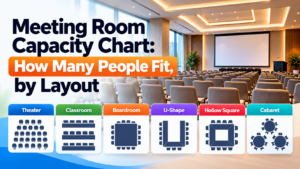
Provide the final seating plan and mark breakout clusters, registration queues and other dense areas. Ask the venue to account for neighboring events and concurrent sessions. Seating layout changes usable capacity and it changes device density with it. How many access points a room needs is a network design decision, so avoid specifying your own attendees-per-access-point figure.
Confirm compatibility with the devices your group brings. A newer Wi-Fi generation does not establish suitability on its own, and equipment supporting one wireless band may not support another. Put older registration scanners, printers and specialist demonstration devices into the technical review, because those are what fail quietly.
Does a private network mean dedicated bandwidth?
An event-specific network name, or SSID, identifies a wireless network. That is all it does. Ask separately what capacity is reserved for it, what infrastructure is shared, and what isolation is configured. Treat the name, the access controls and the bandwidth commitment as three separate quote items.
Ask the supplier to define “dedicated” in its own offer. Does it mean an event allocation on the venue’s existing connection, a separate circuit, or a custom wireless network with nothing reserved behind it? Confirm whether a minimum throughput commitment applies, where it is measured, and whether your rooms share one allocation between them.
Encore’s service comparison separates basic connection support from managed network services that can include event customization, dedicated or dynamic bandwidth, monitoring and reporting. [4] A useful illustration of why “the venue has internet” settles nothing about what you are buying.
If confidential company information will be on the network, have corporate IT review the security settings and network separation. A hidden network name is not a security measure, and Cisco explicitly advises against treating hidden SSIDs as one. [3]
When to request wired connections
Ask the production and venue teams to evaluate wired connections for the main hybrid-meeting system, the streaming encoder, the registration desk and any critical product demonstration. Confirm the physical port location and the internet service sitting behind it. An Ethernet cable guarantees neither reserved bandwidth nor a backup path.
Mark required ports on the room diagram, including the presenter position and the production desk. Confirm cables, adapters, switches, installation labor and safe cable routing. Check when the service goes live, so the team can rehearse before attendees are in the room rather than discovering a problem in front of them.
For a hybrid session, assign ownership of the whole chain: venue connection, production equipment, conferencing platform, and the remote presenter’s own connection. Test the remote presenter from the location and device they will actually use. A clean test inside the venue proves nothing about the network in someone’s home office.
What corporate IT should check before you sign
Give IT the application list and the venue’s network contact. Ask them to test representative managed laptops, sign-in requirements, approved VPN use, and any restriction that affects the meeting platform or cloud software.
Microsoft identifies insufficient bandwidth, firewall or proxy blocking, jitter and packet loss as possible causes of Teams performance problems, and discusses VPN routing and Wi-Fi optimization. [5] Work through that with corporate IT and the venue specialist. Planners should not be adjusting security settings themselves.
Ask how attendees log in, and whether a browser-based sign-in page, a captive portal, has to be completed. Confirm whether sessions expire during the day, and how approved devices without a browser are meant to connect. Test any device-to-device function such as printing or presentation control, since network isolation frequently breaks those while leaving everything else working.
Send connection instructions through the meeting’s approved channels. Ask what the login page collects, who receives it, and whether an alternative access method exists where corporate privacy requirements apply.
How to test it
Arrange a technical review before booking where connectivity drives the venue choice. Agree in the booking documents on any later rehearsal, the acceptance criteria, corrective work, and what happens if the venue cannot deliver what it promised.
Then rehearse realistically once the room is set. A single speed test is one observation and does not reproduce a conference workload. Ask the network team how it will validate expected load and monitor the live event.
- Test from the actual presenter, production, registration and attendee positions, using the purchased service
- Run the real applications: a video call, screen sharing, cloud access, representative file transfers
- Check upload and download throughput, latency, jitter and packet loss against criteria agreed with IT and the platform requirements
- Test attendee login, session persistence, and movement between meeting spaces
- Record the date, network, location, devices, observed load, results, and who owns any corrective action
Latency is delay. Jitter is variation in packet arrival timing. Packet loss means some data never arrives. Those three explain why a video call can be unusable on a connection whose speed test looks excellent, which is the single most common misunderstanding in this whole subject. Ask the technical team to interpret the results against your applications.
Backup and support
Ask who responds during setup, rehearsal and the meeting itself. Record the technician’s contact method, coverage hours, escalation route and any agreed response target. Confirm whether support is on site or remote, and whether it is included or billed.
Define the failure scenarios the backup has to cover. A second Wi-Fi network running on the same internet connection does nothing for an upstream outage. Ask whether the proposed alternative shares a carrier, a building entry route, network equipment or a power supply with the primary service, because a backup that shares all four is not a backup.
A cellular hotspot can work as a limited fallback once tested, but indoor reception and available capacity both need verifying. A phone hotspot will not carry a meeting. Ask the technical team to test the switch to backup, and whether an active call has to reconnect when it happens.
Document a reduced-service plan too. Depending on the agenda that might mean locally stored presentation files, an approved offline registration process, or a prerecorded segment. Name who decides to switch, and which activities get priority when backup capacity is limited.
Which Wi-Fi costs belong in the venue comparison
Ask for a total based on the same meeting scope at each venue. Record whether charges run per device, connection, room, day or event, and whether setup and rehearsal fall inside the service period.
- Bandwidth allocation, event networks and wired connections
- Additional access points, cabling, adapters, equipment rental and installation labor
- Technical support, monitoring, rehearsal time and after-hours coverage
- Backup connectivity, on-site upgrades, change charges, applicable fees and taxes
Mark unpriced items unresolved. Ask about ordering deadlines, cancellation terms, and how extra devices or higher bandwidth get authorized once you are on site. The lowest base Wi-Fi charge routinely omits the services your meeting actually needs, which is why this belongs in the hotel proposal comparison alongside everything else rather than in a footnote. [7] If you are still assembling the technical brief, what production details belong in a venue RFP covers the wider version of this conversation.
A confirmation brief you can send
Send this to the venue’s sales contact and network specialist. Ask for an itemized response or a technical attachment to the booking confirmation.
MEETING PROFILE
Meeting and dates: [Enter]
Rooms and layouts: [Enter]
Setup, rehearsal, and live service hours: [Enter]
Peak attendees and connected devices by room: [Enter]
Peak simultaneous applications and activities: [Enter]
Critical systems and their locations: [Enter]

REQUIRED VENUE CONFIRMATION
Please confirm coverage and capacity for this profile; upload and
download allocation; shared or reserved service; per-device
restrictions; and wired connection locations.

Describe access controls, corporate application compatibility,
technical support, testing arrangements, and backup service.
Identify exclusions, assumptions, and any requirements you cannot
meet.

Please provide the total price, service period, ordering and change
deadlines, technical contact, and applicable service commitments.
State what will be tested, when it will be tested, and the agreed
process if a requirement is not met. Attach the final network scope
to the booking documents.
Anything agreed after this point goes through the venue’s written change process. How to control venue change orders covers why a verbal upgrade on site is the most expensive way to buy bandwidth.
Find a meeting venue that fits your agenda
Use greatEvent to explore venues for your next corporate meeting. [6] Share your attendee count, room needs and connectivity requirements as you evaluate options, and describe what you need to EVA where that helps. Confirm technical suitability with the venue you select, and keep its accepted Wi-Fi scope with the booking details. How many breakout rooms a conference needs and what a meeting room costs cover the other two questions that usually land at the same time.
Research and sources
Sources reviewed October 9, 2026. The primary sources establish application bandwidth figures, the capacity-versus-coverage distinction, and differences in venue service scope. The checklist, confirmation template, cost list and testing workflow are editorial planning tools. No attendees-per-access-point figure, Mbps-per-attendee rule or capacity margin is proposed as a standard, because those are network design decisions.
[1] McCormick Place, Wireless Internet. Published service limitations and the recommendation for wired mission-critical demonstrations. Confirm the current event-specific offering rather than relying on older package speeds.
[2] Zoom, System Requirements for Windows, macOS and Linux. Desktop-app bandwidth guidance including 1080p group video calling. Requirements vary by product and change over time.
[3] Cisco, Wireless for Large Public Networks. Capacity, coverage, on-site verification, shared radio capacity and SSID guidance.
[4] Encore, Internet Services Comparison Guide. Differences between connection support and managed event network services.
[5] Microsoft, Prepare Your Organization’s Network for Teams. Network quality, application access, VPN routing and Wi-Fi planning.
[6] greatEvent, How It Works. Venue discovery and the optional EVA connection. No automated Wi-Fi verification capability is claimed or was confirmed.
[7] greatEvent, Hotel Proposal Comparison Template for Corporate Meetings. Used for comparing the complete meeting venue cost.
Frequently Asked Questions
Is 100 Mbps enough for a corporate meeting? ▾
The number alone settles nothing. Confirm whether it applies to the whole property or to your event, whether it includes upload capacity, and what concurrent devices and applications it has to support. Have the venue specialist assess internet capacity and room-level wireless performance as separate questions.
How many devices should planners count? ▾
Expected attendee devices plus presenter, production, registration and staff equipment. Record peak connected devices separately from devices actively running demanding applications. Estimate by room and session rather than from total registrations.
Does a private SSID mean a separate circuit? ▾
No. Ask the supplier to document the network design, the bandwidth allocation and the shared components. A custom network name establishes neither a separate internet circuit nor any performance commitment.
Should every attendee in a hybrid meeting have a wired connection? ▾
The useful question is which systems need the most dependable connection. Have the technical team prioritize the room’s conferencing system and other critical equipment, then design attendee connectivity around the real workload and devices.
Should Wi-Fi requirements go in the booking agreement? ▾
Yes. Include the accepted service scope, locations, hours, charges, support arrangements and any agreed performance or testing commitments. Resolve the essential requirements before you commit, and record later changes in writing through the venue’s agreed process.
Compare vendors for your next event
Search caterers, photographers, florists, planners, and rentals — then send one request to several vendors at once.