Quick answer: A hybrid event is a meeting, conference, or corporate event where an in-person audience at a venue and a remote audience online join the same program at the same time. Both groups can watch sessions, ask questions, and vote, so the venue has to support live streaming, professional audio, and solid internet.
What is a hybrid meeting? It’s the smaller version: a team, client, or board meeting where some people sit in the room and others join by video. The Events Industry Council’s APEX glossary puts it simply: a meeting that combines face-to-face and virtual aspects.
Once leadership says “make it hybrid,” a ballroom with good Wi-Fi is no longer enough, and the venue search changes. Below, we define the format, compare it with virtual and in-person events, walk through the planning steps, and cover how to choose a venue that works for both audiences. It’s written for corporate, association, and agency planners in the US.
What is a hybrid event (or hybrid meeting)?
In a hybrid event, both audiences share the program live. Remote attendees join the same session as the room, at the same time, and they have a way to take part: Q&A, polls, chat, or a moderator who brings their questions to the stage.
Common corporate examples:
- All-hands or town hall meetings with remote offices dialed in
- Sales kickoffs where field teams join online
- Conferences and summits with a streamed main stage
- Product launches with press and customers watching live
- Board meetings with some directors in the room and others on video
- Training sessions and workshops for distributed teams
Hybrid vs. virtual vs. in-person events
| Factor | In-person | Virtual | Hybrid |
|---|---|---|---|
| Audience | Everyone at the venue | Everyone online | Some at the venue, some online, same program |
| Technology | Room AV: mics, screens, projector | Streaming or webinar platform | Room AV plus cameras, streaming, and interaction tools |
| Venue needs | Space, catering, setup | Often a studio or office, or none | Space plus dedicated internet, production area, camera-ready lighting |
| Main cost drivers | Venue, catering, travel, lodging | Platform, production | All of the in-person costs plus streaming production |
| Engagement | Face-to-face networking | Chat, polls, virtual rooms | Both, and a moderator to connect the two audiences |
For venue selection, this means a hybrid event carries the full cost and logistics of an in-person event plus a production layer, and the venue you pick has to handle both.
How to plan and host a hybrid event
- Define who’s remote and why. Decide which sessions stream, who watches online, and what they need to do: just watch, or ask, vote, and network.
- Pick the platform and production partner early. Their needs, like power, bandwidth, and camera positions, shape which rooms will work.
- Choose a venue that passes the tech checks. Use the checklists below on every site visit.
- Design the program for two audiences. Add a remote moderator, shorter sessions, and planned moments for online questions.
- Write one run-of-show with cues for both the room and the stream.
- Rehearse on the real equipment and connection, with a remote tester watching from outside the venue.
- Run it and measure both sides, from room attendance to online watch time and questions.
Why the venue matters more for hybrid
Many planners compare rental cost, capacity, and location first. For hybrid, those are only part of the decision. Poor acoustics, weak internet, or a cramped room hurt the stream as much as the room. The right venue supports guest interaction, reliable technology, networking, vendor coordination, food and beverage service, and a professional on-camera look. If you’re bringing in outside help, our guide to how much event planners charge helps you budget it before comparing venue proposals.
Not every venue with Wi-Fi is ready for hybrid. Look for:
- Dedicated, high-speed wired internet
- Venue-wide Wi-Fi for attendees
- Professional AV and sound
- Multiple presentation screens
- Flexible seating layouts
- Camera-friendly lighting
- Space for a production area
- On-site technical support
How to evaluate a hybrid venue on a site visit
Go beyond the photos. Walk the space the way guests will, and ask how it performs for both networking and live presentations.
Guest experience and capacity
Don’t choose on maximum occupancy alone. A room that’s too big feels empty, and one that’s too small gets crowded once staging, catering, sponsor tables, and production gear go in. Ask whether guests can move comfortably, whether there’s room to network, and whether production equipment can be set up without blocking anything. Registration should be quick, speakers easy to hear, and food stations easy to reach.
Layout and networking zones
Open floor plans with defined zones help people circulate: a registration area, networking lounge, coffee station, cocktail tables, sponsor area, demo area, a quiet meeting room, and the stage. Check that food stations won’t cause congestion and that camera positions won’t block walkways.
Acoustics
If guests have to raise their voices, networking suffers and the stream picks up the noise. Watch for high ceilings that echo, hard reflective surfaces, kitchen or bar noise, traffic, and loud HVAC. Carpeting, acoustic panels, and soft furnishings help.
Lighting
Lighting affects how speakers look on camera and how comfortable the room feels. Look for dimmable and zoned lighting, even stage light, accent lighting for branding, little screen glare, and blackout shades if there’s daylight. Ask staff to switch between presentation, dinner, and networking scenes during your visit, so you see the real thing rather than marketing photos.
Furniture and food and beverage
Flexible furniture, such as high-tops, lounge seating, and modular staging, keeps networking easy. Ask whether layout changes are included or billed. For catering, ask whether outside catering is allowed, whether there are food and beverage minimums, how dietary needs are handled, whether bartenders are included, and whether prices include service charges and gratuities. Our guide to F&B minimum vs. meeting room rental explains how those terms interact.
Branding, accessibility, and arrival
Confirm what branding is allowed: digital welcome screens, LED walls, backdrops, signage, and sponsor areas. Check accessibility early: step-free entrances, elevators, accessible restrooms, wide walkways, accessible seating and parking, and hearing assistance. For the online audience, plan live captions and easy-to-read slides. Then check arrival: parking for peak attendance, transit access, ride-share drop-off, nearby hotels, rush-hour traffic, and wayfinding. If attendees travel in, our guide to corporate event hotel room blocks covers the sleeping-room side.
Technology and production requirements
For a traditional meeting, a projector and a mic may do. At a hybrid event, every session has to work for the room and for the stream, and that takes infrastructure, professional AV, and a venue team that understands live production.
Internet and redundancy
Ask whether a dedicated wired connection is available, what upload and download speeds the venue will commit to in writing, whether bandwidth is shared with other events, whether on-site IT support is available, and whether there’s a backup connection. A dedicated wired line is usually more reliable than Wi-Fi for streaming. Ask for a speed test during your tour, and get your production partner’s bandwidth requirement in writing so you can compare it with the venue’s.
Plan for failure too: a secondary connection or cellular failover router, backup laptops, spare clickers and mics, extra adapters, power strips, and battery backup for critical gear.
Audio, cameras, and stage
Remote viewers forgive slightly soft video far more readily than bad audio. Ask what the venue already has: wireless handheld and lapel mics, ceiling speakers, a digital mixer, confidence monitors, LED walls or projection, and recording. If equipment is rented, confirm who sets it up, runs it, and troubleshoots.
Plan camera positions early. A typical setup:
| Camera | Purpose |
|---|---|
| Wide shot | Full stage and audience |
| Speaker close-up | Presenters during keynotes |
| Audience camera | Reactions and audience questions |
| Mobile camera | Networking, demos, and sponsor areas |
The stage has to work on camera: clear sightlines, room for confidence monitors, good stage lighting, clean background branding, and easy speaker access. Keep floral arrangements and banners out of camera lines.
Production area and screens
Reserve a separate control area for the technical team, with room for video switchers, streaming computers, the audio console, network gear, headsets, and backup power. Plan more than one screen: the main screen, a speaker confidence monitor, a timer, a live chat or questions monitor, and a feed of remote attendees.
Evaluating a venue’s vendor logistics for hybrid events
Vendor logistics are a common failure point for hybrid events, so ask every venue:
- Load-in: What are the dock and freight elevator hours, and how long is load-in before doors?
- Outside AV: Can you bring your own AV or streaming vendor? Is there a fee for outside vendors, or a requirement to use in-house rigging or power?
- Power: How much dedicated power is available at the stage and production table, and is it billed separately?
- Bandwidth: Who provides dedicated internet, the venue or an in-house provider, and how is it priced?
- Storage and security: Can gear stay overnight in a locked room?
- Vendor paperwork: What insurance certificates and advance notice do outside vendors need?
Get the answers into the contract or event order. A verbal “sure, bring your own AV” doesn’t hold up when an in-house provider’s fee shows up on the invoice.
Venue vs. planner: who handles check-in?
Split this in writing before the event. A common division:
| Task | Usually the venue | Usually the planner |
|---|---|---|
| Registration space | Tables, power, internet, signage holders | Layout, staffing, and flow |
| Attendee data | None | Registration platform and lists, in person and online |
| Badges and materials | Storage and delivery receiving | Printing, badge pickup, handouts |
| Online check-in | Bandwidth at the venue | Platform links, access, and help desk |
| Directional signage | Rules on placement | Producing and placing it |
| Accessibility | Building access and features | Attendee requests and accommodations |
Use the table to start the conversation; your contract decides the final split.
Evaluate the venue team, not just the room
Ask who’ll support you on site: a dedicated AV manager, who handles troubleshooting, whether IT is available all day, whether they’ve run hybrid programs before, and how fast they can replace failed equipment. An experienced team spots problems early.
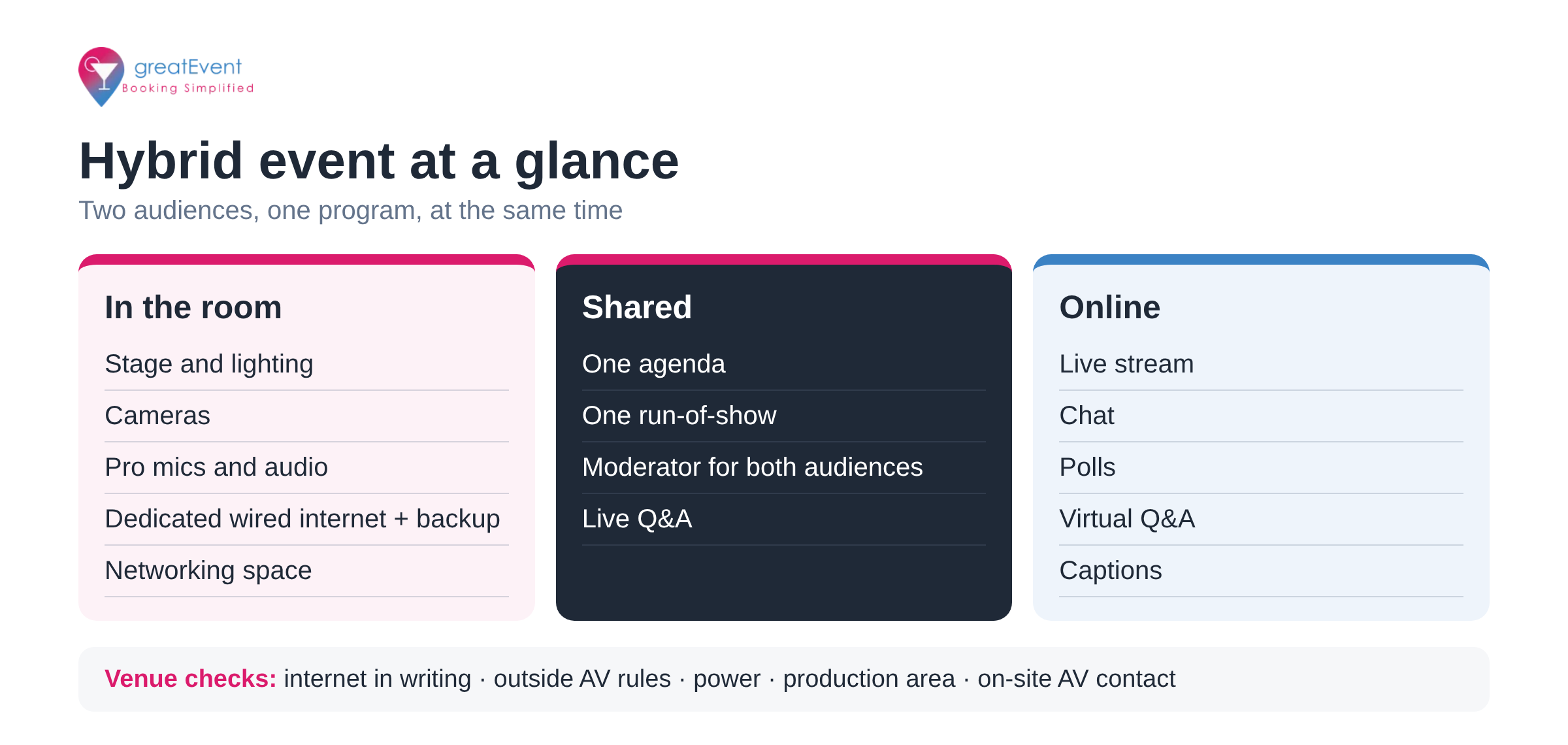
Text version of the infographic: Hybrid event at a glance. In the room: stage and lighting, cameras, professional mics and audio, dedicated wired internet with backup, and networking space. Shared: one agenda, one run-of-show, a moderator who connects both audiences, and live Q&A. Online: live stream, chat, polls, virtual Q&A, and captions. Venue checks: internet in writing, outside AV rules, power, production area, and an on-site AV contact.
Comparing hybrid venue types
Match the venue to the event instead of forcing the event into the space.
| Venue type | Best for | Strengths | Watch for |
|---|---|---|---|
| Hotel ballroom | Conferences, awards, annual meetings | Large flexible space, in-house catering and AV, guest rooms on site | F&B minimums, generic decor, extra AV fees |
| Conference center | Training, seminars, multi-day summits | Many meeting rooms, business-focused setup, AV support | Less social feel; evening events may need another venue |
| Coworking space | Workshops, roundtables, startup events | Modern feel, flexible furniture, good Wi-Fi | Limited capacity, catering, and production |
| Rooftop venue | Networking receptions | Memorable setting, relaxed atmosphere | Weather, noise rules, little production infrastructure |
| Museum or gallery | Executive receptions, launches | Distinctive setting, VIP feel | Strict setup and branding rules, insurance requirements |
| Hybrid studio | Broadcast-first events, shareholder meetings | Built-in cameras, lighting, and streaming | Small audiences, limited hospitality, outside catering |
Which type fits depends on your goals, audience, technology needs, and budget.
Budget beyond the rental fee
The rental price rarely shows the full cost. Ask for a full breakdown: rental, catering minimums, beverage packages, AV, internet upgrades, furniture changes, setup and teardown, security, cleaning, parking, taxes, and service charges. For per-attendee benchmarks, see how much a corporate event costs per attendee and our 2026 US cost per attendee guide. If you’re renting meeting space by the room, check company meeting room rental costs.
Also worth asking: recycling and food waste programs, energy-efficient lighting, local sourcing, and digital signage. Many companies now weigh sustainability in venue choice.
Questions to ask before signing
HYBRID VENUE QUESTIONS
Operations
[ ] Who manages our event on site?
[ ] How many other events are in the building that day?
[ ] Setup and teardown hours? Noise restrictions?
Technology
[ ] Dedicated internet guaranteed in writing? Speeds?
[ ] Backup connection available?
[ ] Outside AV vendors allowed? Any fees?
[ ] Technical support for the full event?
Hospitality
[ ] Dietary accommodations? Outside catering allowed?
[ ] Bartenders and staffing levels included?
Logistics
[ ] Parking included? Loading dock access?
[ ] Overnight equipment storage?
[ ] Nearby hotels for traveling attendees?
Planning, vendor coordination, and event day
Build the timeline early
Delayed decisions make speakers, AV, rentals, and catering harder to secure. A sample timeline you can adapt (not a rule; large events need more lead time, and our guide on how far in advance to book a conference venue goes deeper):
| When | Main tasks |
|---|---|
| 6 months out | Set goals, budget, audience, and venue types; shortlist and visit |
| 4 to 5 months out | Sign the venue, reserve rooms, start speaker outreach, secure production partners |
| 3 months out | Finalize floor plan, catering, registration platform, branding, and agenda |
| 2 months out | Confirm AV, internet specs, furniture, sponsor placement, and vendor schedules |
| 1 month out | Hold production meetings, test technology, finalize attendee communications and signage |
| 2 weeks out | Review the full run-of-show with every vendor; confirm deliveries and staffing |
| Event week | Walk the venue, test equipment, rehearse, review contingency plans |
| Event day | Arrive early, run final tech checks, brief staff, watch the schedule |
Run-of-show and vendor coordination
Everyone works from one run-of-show: registration opening, vendor arrivals, setup, speaker check-in, mic tests, session times, breaks, meals, networking, stream transitions, sponsor announcements, close, and breakdown. Add notes for the online side, such as stream countdowns, Q&A, polls, and moderator cues.
Name one point of contact for all vendors: venue, catering, AV, streaming, photo and video, MC, rentals, registration, security, and cleaning. Send each vendor access times, loading instructions, floor plans, contacts, emergency procedures, the timeline, and equipment needs. A final coordination meeting about a week out catches conflicts. I’d ask every vendor one question: “What could stop you from delivering?” The answers tell you where the risks are.
Technical rehearsal
Rehearse the technology, not just the talks: internet stability, camera switching, audio, screen sharing, transitions, video playback, audience mics, polling, recording, and backup gear. Have a remote tester join from outside the venue.
Engage both audiences and measure results
In the room, use networking sessions, roundtables, demos, and sponsor experiences. Online, use moderated chat, polls, virtual Q&A, downloadable resources, and online-only sessions. The two experiences don’t need to be identical, but each audience needs real ways to take part.
During the event, assign people to watch registration lines, internet and stream quality, audio levels, session attendance, catering, room temperature, and incoming questions. Afterward, measure registered vs. actual attendance, online watch time and replays, poll and Q&A participation, survey results, and business outcomes like qualified leads.
Common mistakes to avoid
Choosing on capacity alone. Review floor plans with staging, production, and catering drawn in.
Assuming public Wi-Fi is enough. Ask for dedicated bandwidth, a backup, and on-site support before signing.
Underestimating production. Cameras, lighting, audio, and the platform need planning well before event day.
Forgetting the remote audience. Give them ways to ask, discuss, and download.
Booking too late. Popular venues fill peak dates early, and late booking leaves less time for vendor coordination.
Next step on greatEvent
Find hybrid-ready corporate venues and compare AV, internet, and capacity on greatEvent.
Register as a professional planner
Research and sources
Updated October 16, 2026. The planning steps, checklists, and venue comparisons are practical guidance, not data. We don’t cite bandwidth numbers or adoption statistics because requirements depend on your platform and production partner. Get those figures from them in writing.
Events Industry Council, APEX Industry Glossary: “Hybrid Meeting” (insights.eventscouncil.org/Full-Article/hybrid-meeting). “A meeting that combines face to face and virtual aspects.”
Frequently Asked Questions
What is a hybrid event?
▾
A hybrid event is a meeting, conference, or corporate event where an in-person audience at a venue and a remote audience online take part in the same program at the same time. The Events Industry Council’s APEX glossary defines a hybrid meeting as one that combines face-to-face and virtual aspects.
What’s the difference between a hybrid meeting and a hybrid event?
▾
Mostly scale. A hybrid meeting is usually a smaller working session, like a team, client, or board meeting, where some people are in the room and others join by video. A hybrid event is a larger produced program, like a conference, sales kickoff, or product launch, with staging, streaming, and an online audience.
What does a venue need to host a hybrid event?
▾
Dedicated wired internet with a backup, professional audio, camera positions and camera-friendly lighting, room for a production area, and an on-site AV or IT contact who’s run hybrid programs before. Confirm each item in writing, not just on a tour.
How do I evaluate a venue’s vendor logistics for a hybrid event?
▾
Ask about load-in times and dock access, whether outside AV vendors are allowed and what fees apply, power capacity at the stage and production table, who supplies dedicated bandwidth, and whether equipment can stay overnight. Get the answers in the contract or the event order.
Who handles check-in at a hybrid event, the venue or the planner?
▾
Usually the planner owns registration, badges, and the attendee list, both in person and online, while the venue provides the space, tables, power, and internet for check-in. Agree on the split in writing before the event.
How much does a hybrid event cost?
▾
It depends on the venue, production level, and streaming platform, so get a full proposal that lists AV, internet, labor, and service charges. For per-attendee ranges, see our corporate event cost guides linked above.
Compare vendors for your next event
Search caterers, photographers, florists, planners, and rentals — then send one request to several vendors at once.